I ran the Wednesday D5&D6 lab with Marie-Claude. The students were very creative in coming up with topics related to their fields of study for the Pecha Kucha. Titles and/or topics are listed as follows:
Nutrition and Food Science Majors:
- "Piggly Wigglies"
- "Obesity"
- "The Hamburger"
-"Western Diet vs. Asian Diet"
- "Why Cows are Great"
- "Raw Food Diet"
- "What Makes a Healthy Diet"
Environmental and Conservation Science/Forestry Majors:
- Topics covered: Forest Types, Flora, Soil Types, Wildlife, Threats, Natural disturbance, Climate and Geography
Human Ecology Majors:
- Topics covered: Areas of Study, Clothing and Textiles, Interior Design, Family Ecology, Child and Youth, Community Diversity, My Practicum
Participants were highly successful in working with the time constraint (20 seconds per slide and 1 minute per speaker)--their discussion was concise and entertaining. They worked very well with the quickly changing visual backdrop, and the slides were highly appealing to look at and imparted just the right amount of information.
This was my first experience with Pecha Kucha and I can see now why it's so popular in so many places!
Friday, September 30, 2011

Pecha Kucha Wednesday and Thursday labs
Now, that Pecha Kucha exercise was fun!
I want to thanks everybody who participated to this week labs!
I was amazed by the creativity that each of you have demonstrated during the Pecha Kucha.
A special thank you as well to all of the students for who English is not their first language. Thank you for accepting the challenge!
Well, we learned that during a presentation one should never panic under stress and one should always stay calm when it doesn't go the way the presentation was planned. We also learned that a good sense of humor is necessary to get you out of troubles!
See you all next week for a new adventure!
I want to thanks everybody who participated to this week labs!
I was amazed by the creativity that each of you have demonstrated during the Pecha Kucha.
A special thank you as well to all of the students for who English is not their first language. Thank you for accepting the challenge!
Well, we learned that during a presentation one should never panic under stress and one should always stay calm when it doesn't go the way the presentation was planned. We also learned that a good sense of humor is necessary to get you out of troubles!
See you all next week for a new adventure!
Thursday, September 29, 2011
Lecture 11: Guest Lecture
Today's guest lecture will be given by Dr. Wendy Doughty. Dr. Doughty will focus on the body language of strong public speaking.
Please add a comment here about Wendy's talk. Also, please send me three tweets about new things you have learned from this lecture.
Dr. Doughty:
Please add a comment here about Wendy's talk. Also, please send me three tweets about new things you have learned from this lecture.
Dr. Doughty:
Holds Doctorate (1995) and Master’s degrees in Educational Administration from the University of Alberta. Has a Bachelor of Applied Science from the University of Guelph. Held increasingly responsible management positions at Grant MacEwan College from 1980 to 1998. Considerable training in group facilitation, program evaluation, applied research and project management. Active community volunteer. is currently a Board member of the Canadian Evaluation Society, Alberta Chapter. Previously Board Chair of Goodwill Industries of Alberta and Vice-Chair of the Alberta Baroque Music Society. Recognized for her work in community education by being named to Who’s Who of Canadian Women and the Canadian Who’s Who. Has considerable international experience, carrying out a variety of international educational needs assessments and design of programs. This work has taken her twice to Uganda, as well as to Hong Kong and Japan. Member, Canadian Evaluation Society
Tuesday, September 27, 2011
Uploading Images to Blogger
Students using their U of Alberta gmail addresses have had considerable problems with uploading images. Here is what AICT said:
Good thing you all have those flickr accounts anyway! :)
Additionally, adding images via the html method also works as I demonstrated in class:
Read more at the HTML Clinic.
"Picasa is not an enabled application within our domain. I tested uploading an image from the web, which worked, and an image from my computer, which didn't. It looks like Blogger tries to upload images from your computer into a Picasa album, which, since it's not enabled, does not exist for ualberta accounts. Unfortunately there are no plans to enable Picasa for ualberta accounts. A workaround may be to get your students to create an account on an image hosting site (such as www.imgur.com), then link to those images, or use the upload from the web option to "upload" the picture to their Blogger accounts."
Good thing you all have those flickr accounts anyway! :)
Additionally, adding images via the html method also works as I demonstrated in class:
"If you need some good clip art images, check out 321ClipArt.com.The <IMG> (Image) tag is a 'one-sided' tag and requires several attributes for successfully embedding an image on your page:
SRC=
If you have a graphic image with the filename my_picture.gif then you would enter the filename as the Value for the SRC= attribute, like this:
<IMG SRC="my_picture.gif">WIDTH= and HEIGHT=
You can set the height and width attributes like this:
<IMG SRC="picname.gif" WIDTH="100" HEIGHT="200">The numbers I used refer to the image size in PIXELS. The above image would therefore appear on the page as 100 pixels wide, and 200 pixels high.
ALT=
It is ALWAYS a good habit to include the ALT= attribute. Some people turn OFF their browsers ability to display pictures for faster performance, and if you do not have a text description to replace the graphic, they won't be able to do or see much on your site. This is especially important if you have a menu built with graphic menu choices."
Read more at the HTML Clinic.
 |
| Image from Matt Northam. |
Lecture 10: Courtney Hughes
Today Courtney Hughes, TA to the CSL students, will talk about speeches/public speaking. Her powerpoint lecture will be added here after class.
Sunday, September 25, 2011
Lecture 9: Speeches
UPDATE: Class is Cancelled Today! See you all on Wednesday.
Today is the introduction to our module on public speaking. We'll start the week's learning by listening to the momentous occasion of Obama's Inaugural Presidential Speech.
For us, they packed up their few worldly possessions and traveled across oceans in search of a new life.For us, they toiled in sweatshops and settled the West; endured the lash of the whip and plowed the hard earth.For us, they fought and died, in places like Concord and Gettysburg; Normandy and Khe Sahn.
You can also find the text of Obama's speech here.
Group Activity Web Quest Obama makes many historical references. What do you know about the topics in the table below? Google, and see what you can find out. Then fill in the google doc:
http://www.google.com/fusiontables/DataSource?snapid=S273476RkWz
For the final activity, you will need to find some rhetorical/literary devices in Obama's speech. This handout here will be of help. Remember, leave your blog comments on this post.
AlES 204: Lecture 9 - Speeches
View more presentations from Jessica Laccetti.
The American Rhetoric website also has an audio recording of Obama's speech.
The American Rhetoric website also has an audio recording of Obama's speech.
Module 4 Labs: Pecha Kucha
What is Pecha Kucha?
Pecha Kucha event is one in which a number of presenters share their ideas within the course of an evening. It follows a 20 x 20 format. Each presenter is allowed 20 slides (shown on a programme such as Powerpoint), each shown for 20 seconds each. This results in a total presentation time of 6 minutes and 40 seconds on a stage before the next presenter is up. The idea is to keep presentations concise and interest level high.
The word Pecha Kucha (pronounced peCHAtchka) comes from the Japanese word for “chit-chat” and was invented by Astrid Klein and Mark Dytham in Tokyo. It has recently spread to the business world, and has now gained interest in the world of English Language Teaching.
As you'll see from the syllabus, this week's labs will require you to practise public speaking in a Pecha Kucha style! Now, you won't be expected to speak for 6 minutes OR to have 20 slides prepared. This is just how it is was originally done - so you have some background. We are just going to build on the idea that there are slides running on a powerpoint and you have to talk for a very limited time. Your TAs will have all the information for you and I will look forward to hearing about the fun you had (and of course, I'll hope for pictures).
Here is an example of a Pecha Kucha presentation:
And another Pecha Kucha presentation on the universe:
Thursday, September 22, 2011
Lecture 8: Facebook for Business
Today is the last lesson of the week focussing on using Facebook as an opportunity to brand ourselves as great potential employees. We are going to make an online cv that people can "like" and "share." Having this online business presence will illustrate a few obvious elements including:
DUE DATE EXTENDED to Monday September 26th, 17:00
- your professional profile
- your up-to-date education/work experience etc.
- your online presence
Also, think about some of the not so obvious aspects that you can show via your online cv:
- your creativity
- sense of humour
- you know how to create memorable content
- you know how to harness social media for a business purpose
NOTE: If you are wary of posting certain information online, please come and see me, and we will create a "paper" version of the assignment.
Note: Remember, this assignment forms part of your e-portfolio. It will not be graded separately BUT if you look at the rubric, you will see what you need to complete.
 |
| Note: Image found at Meghan Oliver |
DUE DATE EXTENDED to Monday September 26th, 17:00
Tuesday, September 20, 2011
Lecture 7: Twitter for Science Communication
Evan Williams on Listening with Twitter
In groups, read "Why Twitter Will Endure"
Then, fill in the main points of the article in the google doc: https://docs.google.com/document/d/1Qiz0IywVkxbBKL98IA_pqZAeGIJWOR1DAZ9YzNn8HdI/edit?hl=en_US
By the end of the activity we will have a complete summary
NOTE: Do not press the back button while working on the google doc otherwise you will refresh the page for everyone!
In groups, read "Why Twitter Will Endure"
Then, fill in the main points of the article in the google doc: https://docs.google.com/document/d/1Qiz0IywVkxbBKL98IA_pqZAeGIJWOR1DAZ9YzNn8HdI/edit?hl=en_US
By the end of the activity we will have a complete summary
NOTE: Do not press the back button while working on the google doc otherwise you will refresh the page for everyone!
Lecture 7 - Twitter and Science
View more presentations from Jessica Laccetti.
Module 3: Facebook for Business
Students, as a comment to this post, leave a link to your blog with your flickr photo of your professional Facebook profile.
In the words of fellow student Jenny Brown, this is what the assignment requires:
Remember, this assignment forms PART of the e-portfolio and as such, needs to follow those guidelines:
You can also watch this video on how to use the print screen command to take a screen capture of your Facebook page/profile.
Information on how to upload images to flickr can be found on flickr help but here are the basics for uploading:
In the words of fellow student Jenny Brown, this is what the assignment requires:
1) "Create a page" on my existing Facebook profile that is like an e-Resume 2) Take a 'print screen' picture of the page with the basic information wall showing
3) Save this photo in Flickr and post it on my blog
4) Write 2-4 paragraphs on my blog pertaining to my facebook page
5) Post a link on the class blog that connects you to my blog post with the flickr photo
Remember, this assignment forms PART of the e-portfolio and as such, needs to follow those guidelines:
At the end of the term, you will have written at least five blog posts. In each blog post (EXCEPT the first Introductory post) you must:
Additionally, throughout the term you must comment on at least five blog posts written by fellow students in this class. You can find links to the students’ blogs on the class blog, under the Module 2 blog post (http://ales-204.blogspot.com/2011/09/module-2-science-journalism-online.html#comments). Comments, like all the writing and interaction in this class, must remain appropriate in level (writing style, mechanics and punctuation) and collegiality. In your final blog post for this project you will need to include links to the five (or more) comments you made.
- Include at least one image
- Include at least one external link (somewhere out in the WWW)
- Include at least one reference to a fellow student’s blog post (you must link to the post, i.e. internal link)
- Be on topic (i.e. related to our class work).
- Each blog post should be at least two paragraphs but no more than four.
Additionally, throughout the term you must comment on at least five blog posts written by fellow students in this class. You can find links to the students’ blogs on the class blog, under the Module 2 blog post (http://ales-204.blogspot.com/2011/09/module-2-science-journalism-online.html#comments). Comments, like all the writing and interaction in this class, must remain appropriate in level (writing style, mechanics and punctuation) and collegiality. In your final blog post for this project you will need to include links to the five (or more) comments you made.
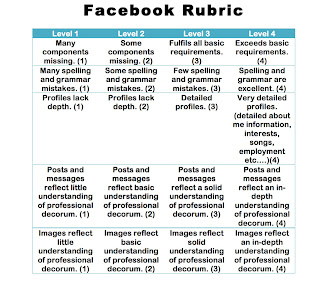
Additionally, here is a rubric for the profile itself:

You can also watch this video on how to use the print screen command to take a screen capture of your Facebook page/profile.
Information on how to upload images to flickr can be found on flickr help but here are the basics for uploading:
How do I upload my photos?
We provide a range of uploading tools for both Windows and Mac that will help you get your photos on Flickr.
You can also email your photos to your Flickr account. You have your own unique email address that you can use to add your photos to your Flickr photostream or to upload photos to your Flickr photostream AND automatically post them to your blog. Configure your email upload settings here.
If you'd rather not install our tools, you can use a web form to upload on the upload page. To use this form, look in the navigation menu at the top of the page under "You."
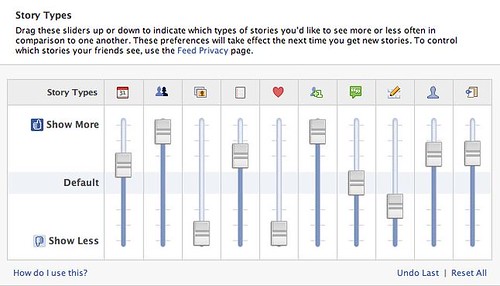
This article will be of interest, "12 Ways to Use Facebook Professionally"
 |
| Note: Image from Gigaom |
Monday, September 19, 2011
Lecture 6: Tweeting Science
Twouble with Twitters: SuperNews!
Lecture 6: Twitter
View more presentations from Jessica Laccetti.
Thursday, September 15, 2011
Lecture 5: Online Class Today
Lots to do today!
By the end of class today students must:
Complete the social media survey on the Module 2 blog post
Set up a blog using Blogger and write an introductory post about you and your field of study and what role communication plays in your work (dissemination of results, linking with fellow researchers, etc.…)
In a comment on the Module 2 blog post, leave a link to your newly started blog and note which Lab Section you are in (absolutely necessary so the professor and TAs can grade your work)
Note: you require a personal blog for your E-Portfolio.
Here is the rubric that will be used to grade your work. Keep it in mind as you write and create your blog so you can satisfy all criteria:

By the end of class today students must:
Complete the social media survey on the Module 2 blog post
Set up a blog using Blogger and write an introductory post about you and your field of study and what role communication plays in your work (dissemination of results, linking with fellow researchers, etc.…)
In a comment on the Module 2 blog post, leave a link to your newly started blog and note which Lab Section you are in (absolutely necessary so the professor and TAs can grade your work)
Note: you require a personal blog for your E-Portfolio.
Here is the rubric that will be used to grade your work. Keep it in mind as you write and create your blog so you can satisfy all criteria:

Subscribe to:
Posts (Atom)